With LANDesk® Mobility Manager, the user is the end point.
The explosive growth of mobile devices in the workplace has created unique challenges for IT managers who need to know:
- What is connected to their network
- That the devices connected on the network are managed and secured
- That they have the ability to remotely manage those devices when a problem or incident arise
Leveraging the investment your business has made in managing desktop and laptops is quite an undertaking. Choosing the right set of tools to help you integrate, implement and manage mobile devices into that existing infrastructure is just as critical to manage your complete IT infrastructure.
LANDesk® Mobility Manager solves these problems by applying renowned LANDesk discovery, inventory, security and management capabilities to mobile devices from a single, easy-to-use console. Mobility Manager offers the flexibility needed to proactively manage mobile device.
Problems it can solve include:
- Workforce Segmentation
- Unauthorized Devices
- Access/Request
- Device Configuration
- Password/Security
- Device Diversity
- Policy Based Management
- User Self-Service
- BYOD (Bring-Your-Own-Device)
- Remote Lock/Wipe
Workforce Segmentation
IT organizations want the ability to segment their workforce when managing mobility devices. Workforce segmentation is the ability to personalize the IT experience to move beyond a one-size-fits-all approach to save costs and increase satisfaction with workplace technologies. LANDesk® Mobility Manager utilizes a sophisticated method of enrolling devices based on policies, and allows IT managers the ability to EXTEND content to users based on roles and responsibilities within their organization.
Device Configuration
Once your organization has full visibility to all enterprise-connected mobile devices and tablets, it is important to offer a simple method of enrollment. Mobility Manager offers profile policy by user/AD Container which is just as easy as configuring email. Once the device is enrolled, mobility manager automatically installs the agent, applies the device configuration and implements the desired security policy for SECURE use.
Unauthorized Devices
The line between personal and business use is blurred more now than ever with more employees wanting to bring their smart phones and tablets to work. Mobility Manager will DISCOVER devices within the environment and prevent unmanaged devices from connecting to the network, which offers the ability to limit access by device type and the flexibility to “Grandfather” existing devices already part of your IT infrastructure.
As shown below, LANDesk Mobility Manager simply installs on top of your current LANDesk Management Suite 9.0 Core Server, plus the addition of the cloud-facing components in the DMZ. The only new piece of infrastructure in your environment is the LANDesk Mobility Manager MDM Server. The same, familiar, console is used to manage the new devices.
Self-Service
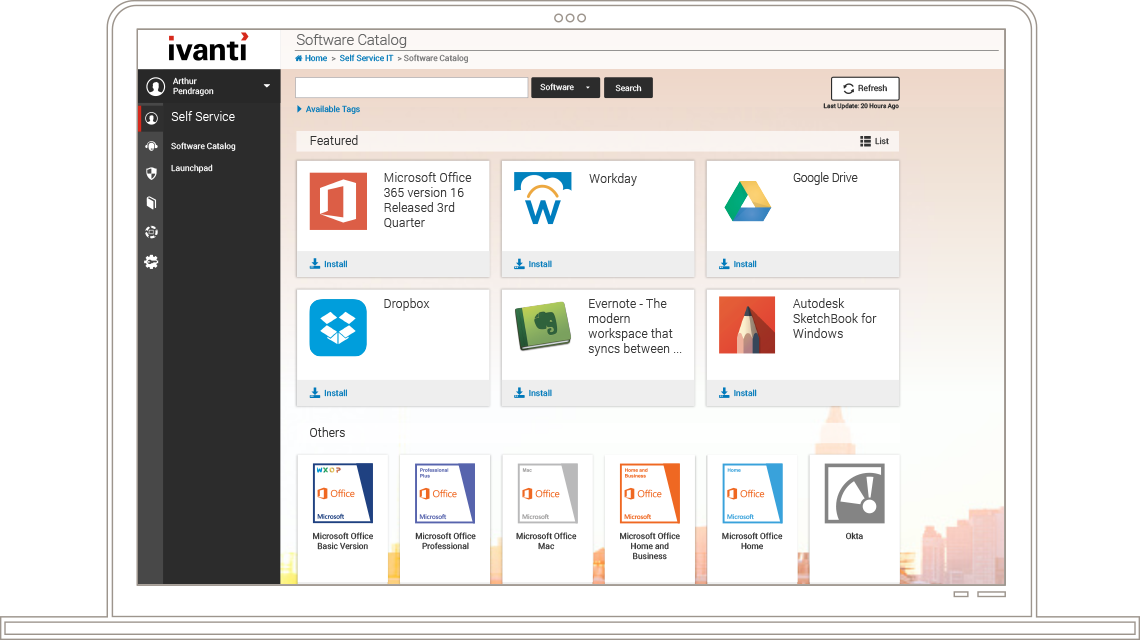
While some IT environments work well with a self-service approach, there are a number of examples where a Mobile Device Management solution is more appropriate. LANDesk® Mobility Manager offers the best of both worlds, the ability to manage devices from a single console, while offering IT organizations the ability to EMPOWER the user to self-service options within LANDesk® MyIT.
| Capability |
Features |
Benefits |
| Simplified Enrollment w/Active Directory and automated certificate provisioning |
User downloads the LANDesk Mobility agent from LANDesk myIT Mobile and inputs credentials to automatically bring device under management. |
Enable device users to easily download, install and activate device management capabilities. |
| Extended hardware and software inventory |
Provides extended hardware & software inventory, including installing applications, policies, memory, battery and network information. |
Determine if a device is compliant, if action should be taken or policies should be distributed. |
| Jailbreak/rooting detections reporting |
Detects and reports about jailbroken/rooted devices. |
Determine if device is compliant, if action should be taken or policies should be distributed. |
| Zero-touch management |
Updates hardware & software, and jailbreak/root status. |
Provide administrator updates without user intervention. |
| Find my phone and location history |
Generates periodic reports on device current location and a breadcrumb trail of past locations. |
Know where a phone is or previous phone locations. |
| Remote lock and wipe |
Enables lock and wipe command to a remote device and allows selective wipe of PIM data. |
Remotely lock or wipe a device if lost or stolen and wipe sensitive PIM data. |
| LANDesk myIT Mobile for Self-service software distribution |
Repository where enterprise resources such as apps, files, videos, and other corporate resources can be accessed. |
Provide the enterprise with a centralize “App Store” for corporate resources that can be accessed whenever and wherever users need. |
| Leverages device platforms’ native push notification services |
Enables notification service to alert device users about the availability of new resources through LANDesk myIT Mobile or other required user actions. |
Always stay up-to-date with applications and other enterprise resources. |
| Specify and invoke all native iOS/Android policies |
Specify and enable the native iOS and Android policies. |
Invoke supported device policies directly from the LANDesk console. |
Key Features
LANDesk® myIT Mobile
- Distribute in-house built apps without submitting to the horizontal app stores (i.e. Apple iTunes, Android Marketplace).
- Launch links in controlled browser, limiting where a user can surf.
- Link to “suggested” applications from multiple horizontal app stores.
- Share documents, policies, and homegrown applications to one or many users.
Device Connection Policy
- Block unwanted devices from connecting to Exchange ActiveSync
- Allow “grandfathered” devices so as to not disturb existing EAS users
Simple Device Enrollment
- Easily allow users to self-configure their BYOD devices
- Simply provision new IT-owned devices
- Policy based by AD integration
Simple Device Enrollment
- Easily allow users to self-configure their BYOD devices
- Simply provision new IT-owned devices
- Policy based by AD integration
Detailed hardware inventory
- Make
- Manufacturer
- OS
- Many more elements!
Device Configuration/Security
- All iOS4 MDM Policies implemented
- SCEP-based configuration for security
- Policy-based by AD integration
Remote Management
- Device Location
- Remote wipe/selective wipe
- Remote lock/unlock/password reset
Single Console
- Integrated into LANDesk Management Suite technologies
- Single console, single database
- No additional vendor contracts
- Seamless management activities across ALL your devices
Supported Devices
Smart Phones
- iPhone
- Google Android (2.x and later)
- BlackBerry
- Palm OS phones and devices
- Microsoft Phone 7
Tablet PCs
- Apple iPad
- Google Android (2.x and later)
- Lenovo
- Dell